Downlink Desk – Description
What the system does
Downlink Desk watches satellites in orbit using telemetry collected by the SatNOGS volunteer ground-station network. It decodes the telemetry, learns what normal looks like for each spacecraft, raises alerts when something departs from normal, and keeps a signed record of every operator action.
It is read-only towards the spacecraft. It receives data; it never sends commands.
How data flows through the system
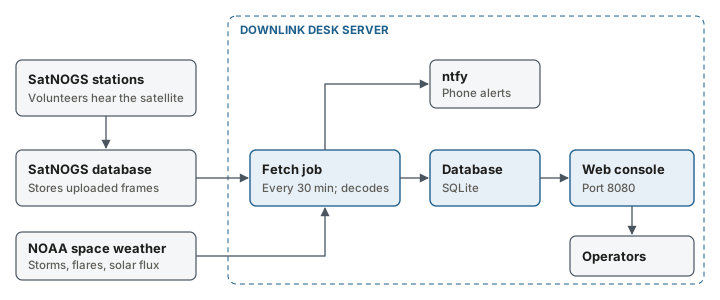
The system has three running parts on the server:
The fetch job runs every 30 minutes by default. It asks the SatNOGS database for new frames, decodes them, stores them, updates the learned model and sends phone alerts. It waits at least 11 seconds between requests to SatNOGS and backs off when asked.
The web console serves the operator screens on port 8080 by default, and records operator actions in the audit trail. Open consoles receive new frames as soon as they are stored.
The updater checks for a new version 5 minutes after boot and nightly at about 03:30, and installs it unless automatic updates are turned off. If the new version does not start, it rolls back.
Data sources
| Source | What it provides | How often |
|---|---|---|
| SatNOGS database | Telemetry frames uploaded by volunteer stations | Every fetch, 30 minutes by default |
| SatNOGS network schedule | Which stations plan to listen, and when | Every 3 hours |
| NOAA Space Weather Prediction Center | Geomagnetic storms, solar flares and solar flux | Every 3 hours |
| Orbit data (TLE) | The satellite's orbit, used for position, sunlight and passes | Every 12 hours |
Data arrives only after a volunteer station has heard the satellite and uploaded the recording. Gaps of several hours are normal.
The console screen
The console has these tabs:
| Tab | Use it to |
|---|---|
| Console | See spacecraft status, alerts, telemetry channels, the live globe, the daily check and the ground segment status. |
| Frames | Look at individual frames received from SatNOGS. |
| Battery | Review battery charge, eclipse depth and estimated life. Shown only when the satellite has enough battery data. |
| Passes & stations | See upcoming passes and which stations heard the satellite. |
| Audit trail | Read and verify the signed record of actions. |
| Shift handover | Write handover notes and sign the console over. |
| About | Check the version, update status and credits. |
Two fields at the top of the screen control who you are: Call sign, which signs your actions, and Passcode, which appears only if the server requires a passcode for changes.
Learned normal
A small satellite warms in sunlight and cools in Earth's shadow on every orbit. For each channel, Downlink Desk learns the typical value at each point of that cycle and compares the last two days with the three weeks before. This lets it flag a channel that is drifting while it is still well inside its limits. The model needs about 25 samples and a few days of history for a channel before it judges it.